


A clear IT department structure defines how technology teams collaborate, innovate, and scale with the business. In this guide, you’ll learn how to design a modern IT org chart, explore common structure models, and see how OrgChart helps visualize roles, reporting lines, and growth across your organization.
Table of contents
- What Is an IT Department Structure?
- Common IT Organizational Structure Models
- IT Department Blueprints by Company Size
- Key IT Organization Structure Roles and Responsibilities
- Quick Steps to Build Your IT Org Chart
- Operating Practices That Make Structures Work
- Build vs. Buy vs. Partner: Making the Right Choice
- Visualizing Accountability: A RACI Example for IT Teams
- IT Department Best Practices
- Common Mistakes to Avoid
- FAQs
A modern IT department structure determines how teams work, make decisions, and support business goals. Clear roles and reporting lines boost efficiency and prevent confusion, duplication, and stalled projects.
This guide explains how to design an IT org chart that scales with your company, aligns structure with strategy, strengthens accountability, and leverages solutions like OrgChart to visualize your workforce.
What Is an IT Department Structure?
Definition and Purpose
An IT department structure outlines how technology teams are organized to plan, deliver, and support an organization’s technology strategy. Within that structure, subsects may manage infrastructure, software, cybersecurity, data storage, applications, and user support (University of San Diego).
A well-designed IT organizational structure clarifies roles and reduces duplication. It also helps employees understand reporting lines, escalation paths, and career progression opportunities.
How Structure Affects Efficiency, Security, and Agility
The way an IT department is organized has a direct impact on performance. Without a clear, guiding structure, even skilled teams can struggle with overlapping responsibilities and slow decision-making.
A clear structure assists with the following:
- Improves efficiency by defining ownership and streamlining workflows.
- Enhances security by assigning accountability for compliance, risk management, and incident response.
Supports agility by enabling teams to adapt quickly to changing business priorities and emerging technologies.
See How OrgChart Simplifies IT Team Structure
Watch how HR and IT leaders use OrgChart to visualize reporting lines, clarify roles, and adapt their IT departments as the company scales.
Common IT Organizational Structure Models
There’s no single best way to organize an IT department. The right approach depends on your company’s size, goals, and operating model.
However, as Joe Peppard, principal research scientist at the MIT Sloan Center for Information Systems Research, points out, most companies still “emphasize the management of technology, rather than leveraging the capabilities of technology.”
Peppard argues that IT should no longer exist as a wholly separate function, but rather as a pervasive model, one where IT capabilities and expertise are woven directly into the fabric of the organization.
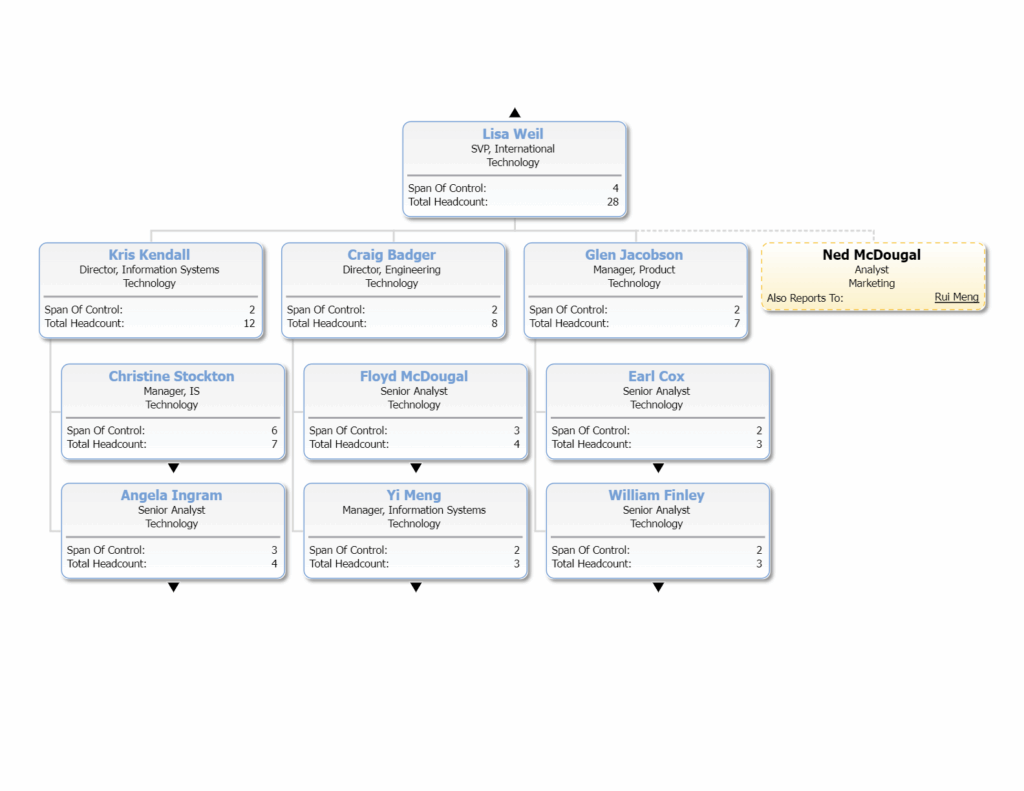
This perspective underscores a crucial shift: modern IT structures must evolve from technology management to business enablement. Below, we outline six of the most common IT organizational structures used today as companies move toward more integrated and adaptive models.
1. Functional Model
Best for: Stable, mature organizations with well-defined processes
The functional model organizes teams by specialization (e.g., infrastructure, applications, security, support). Each team has clear ownership of its domain, making accountability straightforward. However, this approach can create silos and slow cross-team collaboration.
2. Matrix Model
Best for: Project-heavy enterprises or organizations requiring cross-functional initiatives
In a matrix structure, team members report both to functional managers and project or product leads. This fosters collaboration across departments and encourages flexible resource allocation. On the downside, dual reporting can lead to conflicting priorities if not managed carefully.
3–5. Centralized, Decentralized, and Hybrid (MSP) Models
Best for: Small to mid-size firms (centralized), multi-location businesses (decentralized), and growing organizations (hybrid/MSP)
Centralized: IT functions are concentrated under a single leadership team. This approach provides consistency and control but can create bottlenecks as all decisions flow through one group.
Decentralized: IT responsibilities are distributed across business units or regions, allowing faster local responses but increasing the risk of duplicated efforts and inconsistent standards.
Hybrid / MSP: Combines in-house teams with managed service providers (MSPs) or hires contractors to deliver scalability and cost efficiency. Strong governance is required to coordinate external partners effectively.
6. Modern Product and Platform-Based Structures
Best for: Digital-first enterprises or organizations seeking tight alignment between IT and business outcomes
Modern IT departments increasingly adopt a product- or platform-oriented structure, where teams own end-to-end responsibility for specific systems or business capabilities. This model drives innovation, accountability, and business alignment but requires a higher level of IT maturity and leadership oversight.
IT Structure Comparison Table (Cheatsheet)
| Model | Key Advantage | Common Challenge | Ideal For |
| Functional | Clear accountability | Departmental silos | Stable, mature organizations |
| Matrix | Cross-functional collaboration | Conflicting priorities | Project-heavy enterprises |
| Centralized | Consistency and control | Bottlenecks | Small to mid-size firms |
| Decentralized | Fast response to local needs | Resource duplication | Multi-location businesses |
| Hybrid / MSP | Cost efficiency and scalability | Vendor coordination | Growing organizations |
| Platform-Based | End-to-end product ownership | Requires advanced IT maturity | Digital-first enterprises |
IT Department Blueprints by Company Size
As an organization expands, its technology function matures from a handful of generalists keeping systems afloat to specialized teams.
Let’s study typical setups across company sizes so you can benchmark your own department and identify the next logical step in its growth: when to introduce new roles, how to divide responsibilities, and where to invest in automation or expertise.
Small Business (Under 100 Employees)
Small organizations often rely on a compact IT setup with one or two generalists supported by outside vendors. The focus is on keeping systems operational and costs predictable.
Structure characteristics:
- Minimal hierarchy, typically one IT lead or shared responsibility with operations
- Heavy use of managed service providers (MSPs) or contractors
- Reactive approach to maintenance and cybersecurity
When to evolve:
Growth, remote expansion, or increasing compliance needs usually drive the first dedicated IT hires and formal processes.
Mid-Sized Company (100-1,000 Employees)
At this stage, IT becomes more formalized. Clear reporting lines emerge, and teams begin to specialize around infrastructure, applications, and security.
Structure characteristics:
- Defined leadership role (Director of IT or CIO) overseeing multiple teams
- Separation between infrastructure, support, and security functions
- Governance and budget processes were introduced for prioritization and accountability
When to evolve:As complexity grows, companies add project management, data analytics, and business partnership roles to better align IT via thoughtful organizational planning.
Enterprise IT Organization (1,000+ Employees)
In large organizations, IT operates as a strategic pillar of the business. Multiple departments, governance layers, and transformation initiatives run in parallel.
Structure characteristics:
- Clear departmental divisions (infrastructure, security, applications, data, innovation)
- Multiple leadership tiers with specialized directors and VPs
- Formal governance, PMO oversight, and enterprise-wide standards
- Heavy emphasis on scalability, compliance, and innovation enablement
When to evolve:
Enterprises continually realign their IT infrastructure around capabilities such as DevOps, automation, and AI to drive efficiency and innovation.
Build Your IT Department Blueprint
Discover how OrgChart adapts to company size and strategy, streamlining the way IT and HR teams visualize growth and change.
Key IT Organization Structure Roles and Responsibilities
IT departments can be grouped into functional clusters. Understanding these clusters can offer clarity and prevent overlap as IT department structures are built out.
Lead (CIO, CTO, CISO, IT Director)
Responsible for overall strategy, vision, and alignment of IT with business goals. Specific tasks often include:
- Set technology direction and priorities
- Manage executive-level IT budgeting and planning
- Oversee risk and compliance strategy
- Represent IT in organizational leadership discussions
Run (Service Desk, SysAdmin, SRE)
Ensures day-to-day operations and system reliability. Specific tasks often include:
- Maintain the uptime and performance of the infrastructure
- Resolve user issues and support services
- Monitor systems and respond to incidents
- Implement operational best practices
Build (Developers, QA, Automation)
Designs, develops, and maintains applications and automation tools. Specific tasks often include:
- Write and maintain code for internal and external systems
- Test software to ensure quality and reliability
- Develop automation to improve efficiency
- Collaborate with product and business teams
Secure (Security, GRC, IAM)
Protects the organization’s information and ensures compliance. Specific tasks often include:
- Monitor threats and respond to security incidents
- Implement identity and access management
- Maintain regulatory compliance (GRC frameworks)
- Conduct audits and risk assessments
Enable (Platform, FinOps, Architecture)
Provides the tools, processes, and architecture that support IT and business operations. Specific tasks often include:
- Design and manage platforms, cloud, and infrastructure
- Optimize IT costs and resource allocation
- Define architectural standards and frameworks
- Support the deployment and scaling of IT solutions
Decide (Data, BI, BRM)
Translates data into actionable insights for strategic decision-making. Specific tasks often include:
- Collect, manage, and govern data assets
- Build dashboards, reports, and analytics tools
- Support business relationship management
- Provide insights for business and IT strategy
Quick Steps to Build Your IT Org Chart
With knowledge of the essential roles and responsibilities, and how these reporting lines fit into divisions and departments, it’s time to create a visualization with an IT department organizational chart. There are five key steps to make an IT org chart; next we’ll look at some of the different structures the IT organization could take.
1. Assess the current structure
Consider the current state of the IT department organizational structure: is it fit for purpose? Are any teams or divisions overloaded while others are over-resourced? And how does the IT department hierarchy compare and collaborate with the rest of the organization? Consider how you want the IT department to work with others and how its processes should flow, and then assess the size of the department you’ll need to meet your mission.
2. Define roles and responsibilities
Which roles do you need in-house, and what external support might you require, to deliver on the IT department strategy? What will these individuals be responsible for, and how can you make sure they’re aware of these requirements?
3. Group divisions and departments
How will those individuals at step 2 work together? This is where you’ll create divisions and departments – the teams that work together on their own patch, and the way these teams group together to fill out the IT department organizational structure.
4. Visualize the IT department organizational structure
This information technology department structure cannot just live in one person’s head – it needs to be written down, documented, and visualized to ensure every player understands their part. Consider using technology, such as OrgChart, to help create this visualization.
5. Finalize and communicate the IT org chart
And finally, now you have the tech company org structure and it’s both documented and visualized, it’s time to communicate that IT org chart to the rest of the company. Publish it on your internal channels, file it with HR so it can be stored with other org charts, and, importantly, communicate it to the IT department itself so everyone can get to know their role.
Simplify Every Step of Your IT Org Chart
See how OrgChart helps HR and IT leaders define roles, visualize reporting lines, and adapt structures as teams grow. From setup to scale, OrgChart makes it easy to build a clear, connected, and future-ready IT department.
OrgChart is trusted by 2,000+ HR teams worldwide.
Operating Practices That Make Structures Work
Clear practices around governance, metrics, compliance, and collaboration make it easier to align teams, prevent bottlenecks, and deliver real business value. Use this checklist to ensure your structure hits all the marks.
Governance, Communication, and Role Clarity
- Define clear decision rights and accountability using a RACI matrix
- Hold regular cross-team alignment meetings to avoid silos
- Centralize the project and request intake for balanced workloads
- Document escalation paths and responsibilities
- Share dashboards and KPIs for transparency and team alignment
- Explore more about roles and responsibilities
KPI and OKR Frameworks
- Assign KPIs for uptime, ticket resolution, deployment velocity, and other metrics to drive a high-performing team
- Set OKRs aligned with business outcomes
- Review metrics regularly to identify gaps and opportunities
- Ensure team goals map to enterprise strategy
Compliance and Audit Cadence
- Schedule regular audits for security, data, and processes
- Track remediation actions and close gaps quickly
- Keep policies updated and accessible
- Integrate compliance tasks into workflows
Build vs. Buy vs. Partner: Making the Right Choice
Choosing how to deliver IT services directly impacts strategy, cost, and scalability. Some companies keep everything in-house, while others leverage tools or partners to move faster and stay flexible without overburdening internal teams (learn more about using technology to scale).
Build In-House: When Control and Compliance Matter
Keep IT fully internal when security, compliance, or data sovereignty are top priorities. You maintain control and deep system knowledge but take on higher staffing and cost responsibilities.
Buy (SaaS and Tools): When Speed and Efficiency Matter
Ideal for teams needing quick deployment and low overhead. SaaS and automation boost efficiency but may limit customization and deep integration.
Partner (MSPs): When Scale or 24/7 Coverage Is Key
Managed Service Providers (MSPs) extend your team with specialized expertise or round-the-clock support. This model adds scalability but requires strong governance and clear SLAs to ensure accountability.
Trusted By Thousands to Chart Millions




























Visualizing Accountability: A RACI Example for IT Teams
Without accountability built into your IT structure, responsibilities overlap, communication falters, and responses slow down.
A RACI framework (Responsible, Accountable, Consulted, Informed) defines who does what across critical IT activities. It can cover everything from incident management to cloud cost optimization.
Below is a chart showing how a modern IT organization might assign responsibilities:
| IT Function | Responsible (Does the Work) | Accountable (Owns Outcome) | Consulted (Provides Input) | Informed (Kept Updated) |
| Incident Management | Help Desk, SysAdmin | IT Operations Manager | CIO, Security | End Users |
| Change Management | DevOps Engineer, QA Team | Change Advisory Board (CAB) | Security, Compliance | Business Units |
| Security Response | Security Analyst | CISO | Legal, Communications | All Employees |
Documenting a matrix like this clarifies escalation paths, streamlines collaboration, and makes accountability measurable, especially when visualized dynamically in tools like OrgChart.
IT Department Best Practices
Strong IT structures rely on clarity, communication, and continuous improvement. Use these best practices to strengthen alignment and performance.
Align IT goals with business priorities
Ensure every IT initiative supports the company strategy, whether through product delivery, cybersecurity, or operations.
Establish clear communication channels
Use defined reporting lines and collaboration tools to boost coordination and speed decision-making. This requires a clear chain of command.
Invest in employee growth
Provide development opportunities and succession planning to retain talent and encourage innovation.
Prioritize cybersecurity
Allocate sufficient resources for security and promote awareness that cyber defense is everyone’s responsibility.
Monitor performance metrics
Track KPIs for uptime, cost efficiency, and service delivery to close gaps and drive improvement.
Adopt flexible, automation-ready structures
Design agile structures that adapt to change and integrate automation to eliminate repetitive tasks.
Common Mistakes to Avoid
Avoid these frequent missteps that undermine IT structure effectiveness.
Over-Centralization
Too much control slows projects. Fix: Delegate decision-making and standardize processes for consistency.
Over-Decentralization
Excessive autonomy leads to duplication. Fix: Establish shared services and clear governance.
Undefined Roles or Escalation Paths
Ambiguity delays response. Fix: Maintain and review your RACI quarterly.
Ignoring Resource Constraints
Understaffing strains performance. Fix: Use FinOps metrics to align hiring and budgets with demand.
Failing to Adapt to Change
Rigid structures block innovation. Fix: Review org design quarterly and pilot emerging tech teams.
FAQs
What’s the best IT structure for a mid-sized company?
A mid-sized company is often best served by a functional, centralized, or matrix IT structure, depending on how it manages projects and collaboration.
A functional model keeps roles clearly defined by specialty, while a centralized structure strengthens consistency and control across teams. Companies that rely heavily on cross-functional projects may benefit most from a matrix model, which balances functional expertise with project agility.
What’s the difference between a CIO, CTO, and CISO?
The difference lies in their focus and scope:
- CIO (Chief Information Officer): Aligns IT strategy with business goals and manages IT operations.
- CTO (Chief Technology Officer): Drives technology innovation, product development, and technical strategy.
- CISO (Chief Information Security Officer): Oversees information security, risk management, and compliance.
How do I align IT with compliance and business goals?
Start by mapping your IT department within an org chart to clarify roles, reporting lines, and responsibilities. Then, establish governance, define KPIs, and integrate compliance checkpoints so IT initiatives clearly support both regulatory requirements and business objectives.
Get Started: Design Your IT Org Structure
Your IT department thrives when its structure can continuously evolve with your organization. OrgChart makes it easy to visualize, adjust, and scale your team in real time.
Build a Fully Integrated IT Department
Get a hands-on walkthrough of OrgChart, and see how easy it is to visualize and scale your workforce.
What Our Customers Say About OrgChart

Carolina F.
Small Business
Verified User in Pharmaceuticals
Mid-Market (51-1000 emp.)
Jacqueline W.
Mid-Market (51-1000 emp.)
Jillian P.
Head of Talent Acquisition & Onboarding Mid-Market (51-1000 emp.)
Leo C.
Managing Director Mid-Market (51-1000 emp.)